
This guide walks through everything needed to make Creatable creator videos, photos, and creator storefronts available to an agentic AI shopping assistant — so the agent can surface creator videos inline in a conversation, let shoppers discover and browse creators, and report engagement and conversion back through Creatable analytics.
Who this is for. Engineers building or extending an AI shopping assistant for a brand that already runs Creatable. You'll need developer access to the brand's Creatable account: the Content API (Site > Content API), the Analytics API (Account > API Configuration), and your account's clientId and Content API key.
Contents
- How the integration fits together
- Syncing Creatable content into your agent's index
- Managing the asset lifecycle
- Rendering videos and creators in the conversation
- Analytics events and resulting metrics
- Launch checklist
1. How the integration fits together
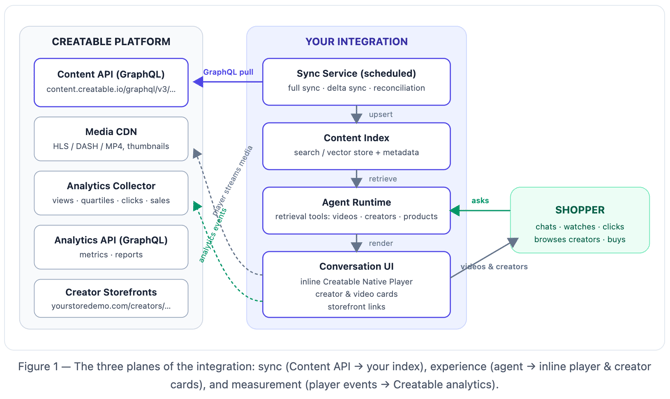
An agentic shopping assistant is fastest and most relevant when creator content is organized for retrieval, matching a shopper's intent ("something for sensitive skin", "how does this jacket fit?") to the right creator videos instantly, from an index the agent owns. The integration is built around that principle, in three planes:
- Data plane (sync). A scheduled sync service pulls videos, creators, and product matches from the Creatable Content API (GraphQL) into your own content index — typically a search or vector store your agent's retrieval tools query at conversation time.
- Experience plane (rendering). When the agent decides a video or creator is relevant, your conversation UI renders it — ideally as an inline Creatable Native Player component (which fires Creatable analytics natively), with a card/click-out fallback for text-only surfaces. Creator results link shoppers to the creator's storefront.
- Measurement plane (analytics). Player interactions fire Creatable analytics events (views, quartiles, watch time, product clicks, purchases). Results come back through the Creatable dashboard and the Analytics API, so you can quantify what the agent surfaced and what it sold.
Prerequisites
- Content API access. In your Creatable dashboard, go to Site > Content API. The API explorer shows your account-specific GraphQL endpoint (
https://content.creatable.io/graphql/v3/{account-hash}), lets you test queries, and includes a COPY CURL button. Your Content API key is available in this playground. - Analytics API credentials. Under Account > API Configuration, note your API username and API key (used as Basic Authentication for the Analytics API).
- Account identifiers. Note your
clientId(Creatable account identifier) — the Native Player requires it.
2. Syncing Creatable content into your agent's index
The Content API is a read-only GraphQL API over your account's published content: videos, photos, creators, matched products, and custom attributes. Results are paginated (default page size 10, maximum 100). Because the API only ever returns currently published content, it doubles as your source of truth for the asset lifecycle (Section 3).
Your endpoint (from Site > Content API)
https://content.creatable.io/graphql/v3/{your-account-hash}
2.1 The API call: a typical request and response
Every call is a standard GraphQL POST to your account endpoint. The API explorer's COPY CURL button produces exactly this shape. Here is a representative request — "give me videos matched to this product" — and its response:
REQUEST
curl -X POST "https://content.creatable.io/graphql/v3/{your-account-hash}" \
  -H "Content-Type: application/json" \
  -d '{ "query": "{
    content(filter: { product_reference: \"8223198773570\" }, per_page: 2) {
      total
      items {
        content_id
        title
        page_url
        creator { full_name uri_stem }
        products { reference_id title price link }
        asset { video {
          thumbnails { url width height }
          sources { hls }
        } }
      }
    }
  }" }'
RESPONSE
{
  "data": {
    "content": {
      "total": 7,
      "items": [
        {
          "content_id": 239175462,
          "title": "How I style the Terra jacket three ways",
          "page_url": "https://www.yourstoredemo.com/videos/terra-jacket-three-ways",
          "creator": {
            "full_name": "Haley Nguyen",
            "uri_stem": "/creators/haley-nguyen"
          },
          "products": [
            {
              "reference_id": "8223198773570",
              "title": "Terra Waterproof Jacket",
              "price": 148.00,
              "link": "https://www.yourstoredemo.com/products/terra-waterproof-jacket"
            }
          ],
          "asset": {
            "video": {
              "thumbnails": [
                { "url": "https://cdn.creatable.io/.../640x360.jpg", "width": 640, "height": 360 }
              ],
              "sources": {
                "hls": "https://cdn.creatable.io/.../manifest.m3u8"
              }
            }
          }
        }
      ]
    }
  }
}
The response is plain JSON mirroring the query's shape: request only the fields you need, and that's all that comes back. Syntax errors return a JSON error object with the offending line and column.
2.2 Content metadata: what's attached and where it comes from
Each content item carries the metadata an agent needs for retrieval, rendering, and commerce. Fields populate as follows:
| Metadata | Fields | How it gets populated |
|---|---|---|
| Identity | content_id, reference_id |
content_id is the unique ID Creatable assigns to the asset at publish — use it as your index key and as the player's videoId; reference_id is the shared ID used to correlate the asset with external systems |
| Descriptive | title, description, tags |
Set at upload and during moderation/curation in the Creatable platform |
| Transcript & captions | asset.video.transcript, asset.video.cc[] |
Generated from the video's spoken audio; caption tracks are provided per language for ADA compliance |
| Products / SKUs | products[]: reference_id, title, price, sale_price, link, image |
Sourced from the brand's product feed imported into Creatable; products are matched to content in the platform, and products[].reference_id carries the brand's own product/SKU identifier — this is the join key to your commerce catalog |
| Creator | creator: creator_id, full_name, thumbnail, uri_stem, tier fields |
From the creator's Creatable profile; uri_stem is present when the creator has a storefront |
| Custom attributes | attributes[] (code/value pairs) |
Defined by the brand in the platform to segment content for placements (e.g. pdp_eligible: yes) |
| Media renditions | asset.video.sources (HLS/DASH/MP4), thumbnails[] |
Generated by Creatable's transcoding pipeline at multiple resolutions, served from the CDN |
2.3 The initial full sync
On first run, page through the entire video catalog ordered by creation_date ascending, requesting every field your agent will need downstream — retrieval text (title, description, tags, transcript), rendering data (thumbnails, player IDs), commerce data (matched products), and creator data (name, avatar, storefront path). Before starting, record the current timestamp — it becomes the initial high-water mark for the delta sync in 2.4.
GraphQL — full sync page (repeat, incrementing page, until you've fetched total items)
{
  content(
    filter: { content_type: video }
    sort: [{ name: creation_date, direction: asc }]
    page: 1
    per_page: 100
  ) {
    total
    items {
      content_id
      reference_id
      title
      description
      content_type
      creation_date
      modified_date
      tags
      page_url
      creator {
        creator_id
        full_name
        thumbnail
        uri_stem
      }
      products {
        product_id
        reference_id
        title
        link
        image
        price
        sale_price
      }
      asset {
        asset_type
        video {
          sources {
            hls
            dash
            mp4 { height width url }
          }
          thumbnails { height width url }
          cc { label lang url default }
          transcript
        }
      }
    }
  }
}
Why the transcript matters. asset.video.transcript is the text of everything spoken in the video. For an agentic system this is the single highest-value field: embed it (together with title, tags, and matched product titles) so the agent can retrieve videos by what the creator actually says and demonstrates, not just by title keywords.
2.4 The incremental (delta) sync
After the full sync, run a delta sync on a schedule — every 15–60 minutes is a good freshness target for a shopping assistant. Store a high-water mark — initialized to the timestamp recorded at the start of the full sync, then advanced to the largest modified_date each delta run processes — and ask only for content modified since then:
GraphQL — delta sync since your last high-water mark
{
  content(
    filter: {
      content_type: video
      modified_date: { gt: "2026-08-19T02:00:00Z" }
    }
    sort: [{ name: modified_date, direction: asc }]
    page: 1
    per_page: 100
  ) {
    total
    items {
      content_id
      modified_date
      title
      description
      tags
      page_url
      creator { creator_id full_name thumbnail uri_stem }
      products { product_id reference_id title link image price sale_price }
      asset {
        asset_type
        video {
          sources { hls dash mp4 { height width url } }
          thumbnails { height width url }
          transcript
        }
      }
    }
  }
}
Upsert each returned item into your index keyed on content_id, then advance the high-water mark to the last item's modified_date. Because results are sorted ascending, a crash mid-run resumes safely — you'll simply re-upsert a few items (upserts are idempotent).
2.5 Syncing creators
Creators are embedded on every content item, so a simple approach is to derive your creator index from the content sync: aggregate distinct creator objects as you ingest, counting videos per creator as you go. The Content API also exposes a creators query you can use to look creators up directly:
GraphQL — find creators by name
{
  creators(filter: { search: { term: "Haley" } }) {
    items {
      creator_id
      full_name
      thumbnail
      uri_stem
    }
  }
}
The uri_stem field is the path to the creator's storefront if one exists (e.g. /creators/haley). Prefix it with the domain where your Creatable storefronts are deployed (your subfolder or subdomain integration — see your storefront integration setup) to produce the link your agent hands to shoppers who want to browse that creator.
2.6 Structuring the index for an agent
Store two representations of every video:
| Layer | Contents | Used for |
|---|---|---|
| Retrieval document | Embedding (and/or keyword index) of title + description + tags + transcript + matched product titles and reference_ids + creator name |
The agent's semantic search: matching shopper intent to videos |
| Render payload | content_id, title, best thumbnails[] URL, page_url, creator name + thumbnail + uri_stem, products[], modified_date, sync status |
Everything the UI needs to render a card or player without another API call |
Then expose the index to your agent as tools. A minimal, effective tool surface:
Agent tool definitions (illustrative — adapt to your agent framework)
search_videos(query, product_reference?, creator_id?, limit)
  → ranked render payloads from your index

get_videos_for_product(product_reference)
  → videos whose products[].reference_id matches the PDP the shopper is discussing

search_creators(query)
  → creator cards: name, avatar, storefront link, video count

get_creator_videos(creator_id)
  → that creator's videos, newest or best-performing first
Sync vs. live calls. If you ever need a real-time answer the index can't give (e.g. "does this exact video still exist right now?"), a targeted live query is viable — see the serve-time check in Section 3. But routine retrieval should always hit your own index: it keeps conversation latency predictable and your embeddings under your control.
2.7 Matching content to a product query
When the shopper's context is a specific product — they're on a PDP, or they've named an item in chat — resolve content in this order, stopping at the first step that returns results above your relevance threshold:
- Exact product match. Query your index (or the API live) for videos whose
products[].reference_idequals the product's reference. This is the strongest signal: the product was explicitly matched to the content in the Creatable platform{
content(filter: { product_reference: "8223198773570" }) {
total
items { content_id title products { title reference_id } }
}
}When products have parent/variant structures, normalize to the parent reference at index time so any variant SKU resolves to the same content.
- Product-focused search. No exact match — search on the product's title and key terms with the
product_focusedsource, which weights product-relevant fields:{
content(filter: { search: { term: "waterproof jacket", mode: flexible, source: product_focused } }) {
total
items { content_id title creator { full_name uri_stem } }
}
} - Semantic retrieval. Fall back to your index's embedding search over transcripts, titles, and tags — this catches videos where a creator demonstrates the product category without a formal product match (e.g. a layering tutorial relevant to any jacket).
- Creator fallback. If no individual video clears the threshold, surface a creator card instead — a creator whose content clusters around the product's category — routing the shopper to a storefront rather than a weak video.
When there is no clean match, serve nothing. Set an explicit relevance threshold, and instruct the agent to answer without media below it. Constrain steps 2–3 to shoppable content with has_products: true if your placement requires every surfaced video to be purchasable. A conversation with no video is neutral; a conversation with an irrelevant video erodes trust in every future recommendation. Log these no-match queries — they are your content-gap report, and the input to the brand's next creator brief.
When multiple candidates clear the threshold, rank by performance rather than recency alone — the Content API supports engagement and conversion sort orders (see Section 5).
3. Managing the asset lifecycle
Creators remove content; brands unpublish it; product matches change. An agentic system that serves a deleted video breaks the shopper experience, so lifecycle management is not optional. The Content API's behavior gives you a clean contract: content that is unpublished or removed no longer appears in API results. Your job is to notice the disappearance and remove the local copy.
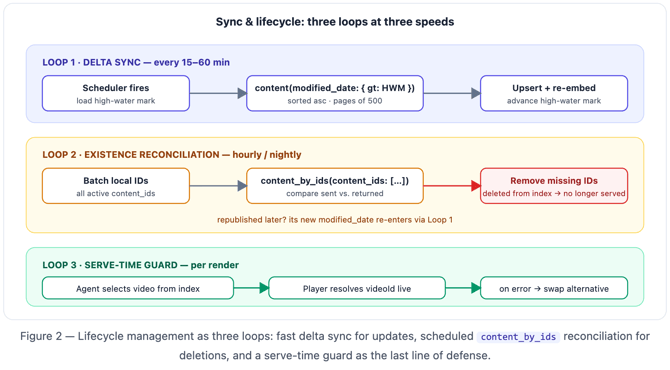
Use three complementary mechanisms, cheapest first:
3.1 Delta sync catches updates (continuous)
The modified_date delta sync from Section 2 keeps changed items fresh — retitled videos, re-matched products, updated thumbnails. It cannot catch deletions, because a deleted item never appears in any result set. That's what the next two mechanisms are for.
3.2 Existence reconciliation with content_by_ids (scheduled)
On a slower schedule (e.g. hourly or nightly, depending on how sensitive your catalog is), verify that the IDs in your index still exist. Batch your locally-known IDs into content_by_ids queries; any ID you sent that does not come back is gone and must be removed:
GraphQL — existence check for a batch of locally-indexed IDs
{
  content_by_ids(content_ids: [ 1234567890, 2345678901, 3456789012 ]) {
    content_id
    modified_date
  }
}
Reconciliation logic (pseudocode)
local_ids  = index.all_active_content_ids()
for batch in chunks(local_ids, BATCH_SIZE):
    returned = creatable.content_by_ids(batch)          # GraphQL above
    missing  = set(batch) - set(returned.ids)
    for content_id in missing:
        index.remove(content_id)                        # stop serving immediately
        log.info("asset removed", content_id=content_id)
3.3 Serve-time guard (per render, optional but recommended)
For the strongest guarantee, validate at the moment of rendering. Two options, in order of preference:
- Let the player be the guard. When you render with the Creatable Native Player by
videoId(Section 4), the player fetches the asset from Creatable at load time — a removed asset simply won't resolve. Listen for the player'serrorevent and gracefully replace the component with an alternative video from your index. - Pre-flight check. Before rendering, issue a single-ID
content(filter: { content_id: … })query — cheap insurance for high-stakes surfaces.
4. Rendering videos and creators in the conversation
When the agent's retrieval tools return a relevant video or creator, the conversation UI needs to render it. Support both approaches, chosen by what the agentic surface can display:
| Approach | When to use | Where analytics fire |
|---|---|---|
| Inline Creatable Native Player
(RICH) |
Your surface renders HTML/web components (your own chat UI, a webview, an embedded widget) | Natively, from the player, in the conversation itself |
|
Card + click-out (FALLBACK) |
Text/markdown-only surfaces, or third-party agentic channels you don't control | On the Creatable-hosted destination (page_url or storefront) after the click |
4.1 The inline Creatable Native Player
The Creatable Native Player is a web component. Load its script once in your chat surface, then render a <creatable-player> element for each video the agent surfaces. Rendering by videoId is preferred: the player fetches the current asset from Creatable itself (which also gives you the serve-time lifecycle guard from Section 3) and fires Creatable analytics events natively as the shopper interacts.
HTML — inline player inside an agent message bubble
<script src="https://cdnjs.creatable.io/player/native.js"></script>

<creatable-player
  id="creatable-video"
  clientId="YOUR_CLIENT_ID"
  videoId="239175462"                <!-- content_id from your index -->
  apiKey="YOUR_CONTENT_API_KEY"      <!-- from the Content API playground -->
  controls
  playsinline
  muted
  analytics='{"event_source": "agentic-chat"}'
  style="width: 360px; height: 640px; object-fit: cover"
></creatable-player>
Tag your traffic. The analytics attribute passes tracking metadata with every event the player fires. Setting an event_source such as "agentic-chat" is what lets you later separate agent-surfaced views and conversions from your PDP and gallery placements. Coordinate the exact value with your Creatable account manager so it appears in your reporting.
Key player attributes:
| Attribute | Purpose |
|---|---|
clientId |
Your Creatable account identifier (required) |
videoId |
Creatable video ID — the player auto-fetches the asset. Alternatively pass src with a direct media URL from the Content API (asset.video.sources.*) |
apiKey |
Content API credential from the API playground (required) |
poster |
Preview image — use a thumbnails[] URL from your index |
controls, autoplay, muted, loop, playsinline, preload |
Standard HTML5-style playback behavior. If you autoplay in a feed-like chat, pair it with muted |
The player exposes a JavaScript event API you can use to drive the conversation itself — for example, letting the agent react when a shopper finishes a video:
JavaScript — feeding player events back to the agent
const player = document.getElementById('creatable-video');

player.on('play',  () => agent.notify('shopper_started_video', { videoId }));
player.on('ended', () => agent.notify('shopper_finished_video', { videoId }));
// agent can now follow up: "Want to see the products from that video,
//  or more from this creator?"

player.on('error', () => {
  // Serve-time lifecycle guard (Section 3): asset no longer resolvable.
  replaceWithAlternative(videoId);
});

player.on('timeupdate', ({ currentTarget: { currentTime } }) => {
  // optional: your own engagement heuristics
});
4.2 Video cards with click-out
Where you can't run scripts (plain-markdown agent surfaces, some third-party channels), render a card from the render payload in your index — thumbnail, title, creator name — linking to the video's page_url (its Creatable-hosted page on your domain). The Creatable player on that destination fires all analytics normally, so measurement stays intact; you only lose the in-conversation playback.
Card template (markdown-flavored surfaces)
[]({page_url})
**{title}** — {creator.full_name}
{products[n].title} · ${products[n].price}
4.3 Surfacing creators and storefront navigation
When a shopper's intent is creator-shaped ("who makes good curly-hair tutorials?", "show me more from her"), the agent should return creator cards rather than individual videos: the creator's full_name, thumbnail, a line of context your agent composes (e.g. "12 videos · skincare & SPF"), and a storefront link built from uri_stem. Storefront visits and any resulting sales are tracked by Creatable automatically (storefront views are a first-class metric — see Section 5).
Composing the storefront link
storefront_url = STOREFRONTS_BASE_URL + creator.uri_stem
// e.g. "https://www.yourstoredemo.com" + "/creators/haley"
// STOREFRONTS_BASE_URL depends on your storefront deployment
// (subfolder reverse-proxy or subdomain — see Creatable Storefronts Integration)
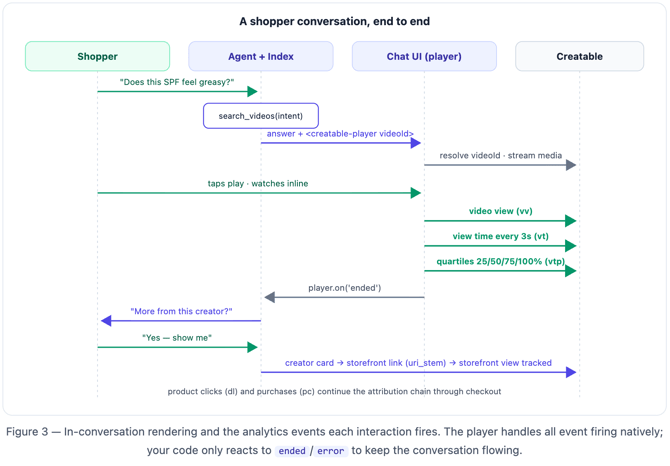
A good conversational pattern chains the two: video answer → "more from this creator?" → creator card → storefront click-out. Each hop is tracked, so the funnel is measurable end to end.
5. Analytics events and resulting metrics
5.1 What fires, and when
When you render with the Creatable Native Player (or any Creatable-hosted experience the shopper clicks out to), analytics are enabled by default — you do not implement event firing yourself. The events behind Creatable measurement are:
| Event | rt value |
Fires |
|---|---|---|
| Viewing session | cid |
Once, to establish the viewer's session ID (response contains the cid) |
| Video view | vv |
Once when playback starts (and again if playback restarts after completion). Resuming from pause does not re-fire |
| Quartiles | vtp |
As the viewer crosses 25%, 50%, 75%, and 100% of the video |
| View time ("heartbeat") | vt |
Every 3 seconds of continuous playback; pausing stops it |
| Product link click | dl |
When the shopper clicks through to a product — the attribution hook |
| Purchase | pc |
At conversion, carrying transaction ID (tid) and line items (pr[]: SKU/price/qty), linking the sale back to viewed content |
| Storefront view | pm |
When a creator storefront loads (tracked automatically on Creatable-hosted storefronts) |
Building a fully custom player instead? If your agentic surface must use its own player (e.g. a native mobile app rendering asset.video.sources.hls directly), you can fire these events yourself against Creatable's collector — production endpoint https://api.tvpage.com/api/__tvpa.gif, staging https://stage.tvpage.com/api/__tvpa.gif — passing your account ID (li), hostname (hn), the viewer's cid, and the event's rt parameters. Obtain a cid with ?rt=cid, persist it, and append _cid= to URLs when handing off between app and webview so the session stays stitched. See Mobile app analytics and conversion tracking and Analytics tracking for external players in the developer guide, and involve your Creatable account manager — this path requires certification against staging.
5.2 Reading the results — the Analytics API
Everything the player fires rolls up into your Creatable dashboard and the Analytics API (GraphQL, Basic Authentication with the API username/key from Account > API Configuration; up to 10 requests/second, max 100 items per page). The metrics query returns the site and sales metrics your agentic integration will move:
GraphQL — Analytics API metrics query
{
  metrics(start_date: "2026-07-01", end_date: "2026-08-19") {
    site {
      views_count
      video_views_count
      video_visits_count
      storefront_views_count
      storefront_visits_count
    }
    sales {
      video_conversions_count
      video_sales_amount
      video_conversion_rate
      revenue_per_video_view
      storefront_sales_amount
      storefront_conversion_rate
      conversions_count
      average_order_value
      sales_amount
    }
  }
}
5.3 The metrics that tell you the agent is working
| Question | Metric(s) |
|---|---|
| Is the agent surfacing videos shoppers actually start? | video_views_count, video_visits_count (trend after launch; segment by your event_source tag) |
| Are shoppers watching, or bouncing? | Quartile completion and view-time (heartbeat) depth in your dashboard reporting |
| Is video driving discovery of creators? | storefront_views_count, storefront_visits_count |
| Is it selling? | video_conversion_rate, revenue_per_video_view, video_sales_amount, storefront_conversion_rate, average_order_value |
Two practices make this data far more useful for an agentic system:
- Segment agent traffic. The
event_sourceyou set on the player'sanalyticsattribute (Section 4) is what separates "the agent recommended this" from every other placement. Without it, agent impact is invisible inside site-wide totals. - Close the loop into retrieval. The Content API supports sorting by first-party performance —
engagement(views) andconversion(sales). Sync with these sort orders and record each item’s rank position as a ranking signal, so the agent learns to prefer content that converts:
GraphQL — sync-time ranking signal: highest-converting content first
{
  content(
    filter: { content_type: video }
    sort: [{ name: conversion, direction: desc }]
    per_page: 100
  ) {
    items {
      content_id
      title
    }
  }
}
The flywheel. Sync brings performance data in → the agent ranks with it → shoppers watch and buy → the player reports it → the next sync makes the agent smarter. This closed loop is the payoff of doing all three planes rather than just the embed.
6. Launch checklist
-
Content API endpoint verified in the API explorer (Site > Content API); test query returns your catalog
- Full sync completed; index contains retrieval documents (with transcripts) and render payloads for every active video
- Delta sync scheduled (15–60 min) with a persisted
modified_datehigh-water mark - Existence reconciliation scheduled with
content_by_ids; removal verified by unpublishing a test asset and confirming the agent stops serving it - Agent retrieval tools (
search_videos,get_videos_for_product,search_creators,get_creator_videos) wired to the index - Native Player renders inline with
clientId,apiKey, andanalyticsevent_sourceset;errorhandler swaps in an alternative video - Card fallback in place for non-HTML surfaces, linking to
page_url - Creator cards link to storefronts via
uri_stem+ your storefront base URL - Events verified end-to-end: play a video in the conversation, confirm
vv/vt/vtparrive (staging first if using a custom player) - Analytics API
metricsquery wired into your reporting; agent traffic segmented byevent_source - Rate limits respected: batch sync pages (max 100/page on Content API), stay under 10 req/s on the Analytics API
Reference documentation
- Content API — Query Examples
- Content API — Data Dictionary
- Creatable Native Player
- Analytics tracking for external players
- Mobile app analytics and conversion tracking
- Analytics API — Getting Started
- Analytics API — Examples
- Creatable Storefronts Integration
Questions or a use case not covered here? Contact your Creatable account manager or support@creatable.com.