
Before you can be paid, add your payment details and tax information. You only need to do this once.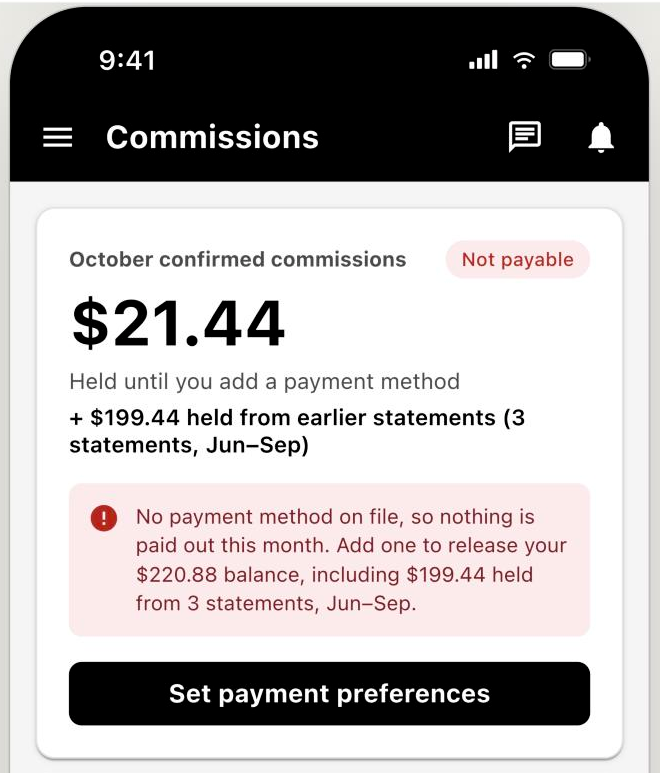
Until you add a payment method, your balance is held and the Commissions screen prompts you to set your payment preferences.
- Go to the Statements section of your Creatable account and click Payment Setup. In the mobile app, tap Setup.
- Enter your contact information.
- Choose your preferred payout method and complete any details that method requires.
- Complete your tax form:
- In the United States: fill out the digital W-9. Creatable uses it to issue your 1099 as an independent contractor.
- Outside the United States: a W-8 is generally required. Depending on your region, you may be asked for additional information.
Payment methods and fees
You can choose from several payout methods during setup. Fees vary by payment method and are paid by the creator, so review the fee for each option before you choose. You can update your payout method at any time from Statements > Payment Setup.
For more detail, see Set up your payment information.
Step 2: Monitor your commissionsTrack everything you've earned in the Commissions section of your Creatable dashboard. Check it anytime to see new sales, which commissions have qualified, and how close you are to your next payout. Your monthly statements are available in the Statements section.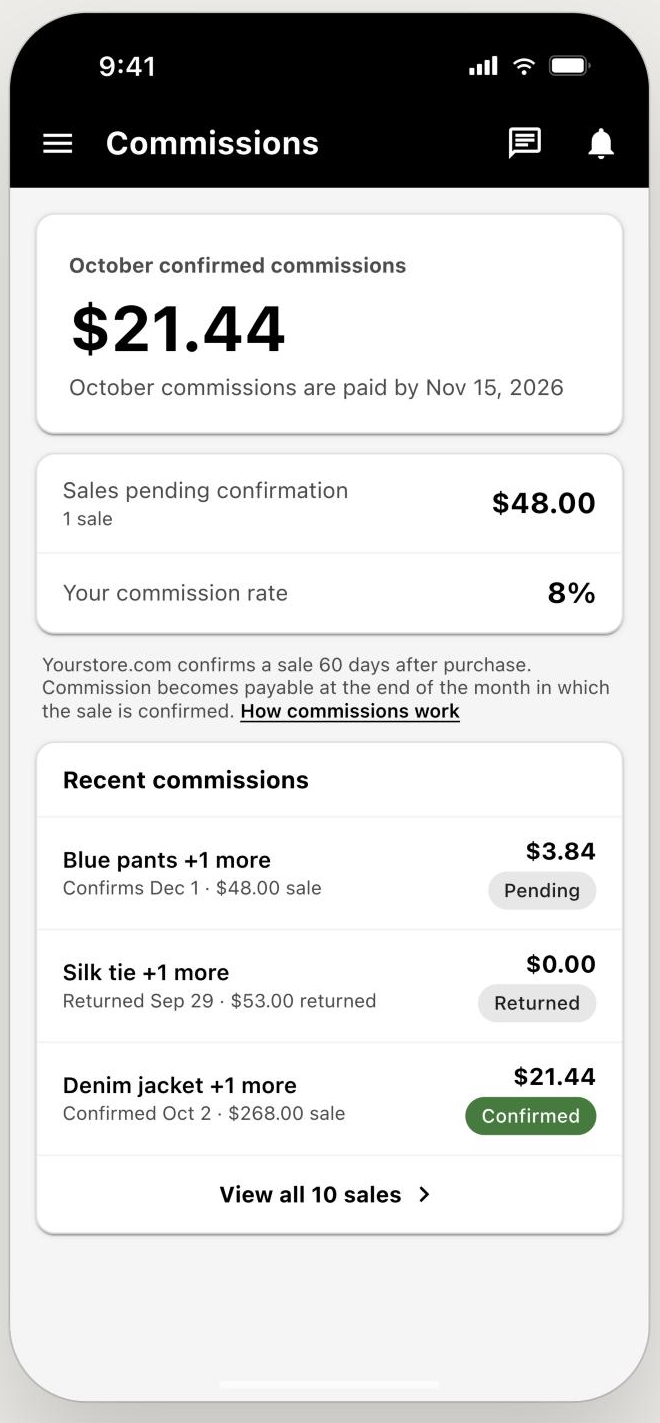
The Commissions screen shows this month's confirmed commissions and when they'll be paid, sales still pending confirmation, your commission rate, and the status of each recent commission: Pending, Confirmed or Returned.
When a commission is earned
A commission is earned when the sale it comes from is qualified. Each brand sets a qualification period to cover its returns window, typically 30, 60, or 90 days after the sale. Once that period ends and the sale hasn't been returned, the commission qualifies and becomes eligible for payout.
This means a sale you drive today won't be paid out right away. It's paid in the monthly payout after it qualifies.
Step 3: Get paidPayouts run on a monthly cycle:
- End of the month: commissions that qualified during that month are totaled and a payout is created.
- By the 15th of the next month: the payout is sent to your chosen payment method.
For example, say you drive a sale on January 10 for a brand with a 60-day qualification period. The sale qualifies on March 11, is included in the payout created on March 31, and is paid by April 15.
Minimum payout thresholdThe minimum payout is $20. If your balance is below $20 at the end of a month, it carries over and keeps growing until you reach the threshold.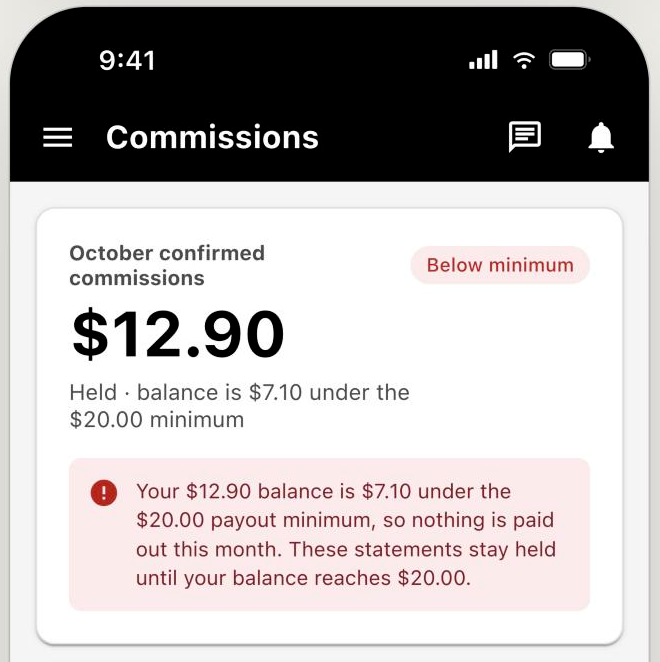
When your balance is under $20, the Commissions screen shows how much more you need before your next payout.
If you haven't reached $20 by the end of the year, Creatable will pay out your full balance as of January 31 each year, so you never lose what you've earned.
If any creator is unpayable as of January 31 each year, commissions will be credited back to the brand.
Payment options by country
| Payee country | Wire transfer | Global ACH / Local bank transfer | Check | PayPal |
| Afghanistan | X | |||
| Aland Islands | X | X | X | |
| Albania | X | X | X | X |
| Algeria | X | X | X | |
| American Samoa | X | X | ||
| Andorra | X | X | X | |
| Angola | X | X | ||
| Anguilla | X | X | ||
| Antarctica | X | X | ||
| Antigua and Barbuda | X | X | X | |
| Argentina | X | X | X | X |
| Armenia | X | X | ||
| Aruba | X | X | ||
| Australia | X | X | X | X |
| Austria | X | X | X | X |
| Azerbaijan | X | X | ||
| Bahamas, The | X | X | X | |
| Bahrain | X | X | X | |
| Bangladesh | X | X | ||
| Barbados | X | X | X | |
| Belgium | X | X | X | X |
| Belize | X | X | X | |
| Benin | X | X | ||
| Bermuda | X | X | X | |
| Bhutan | X | X | ||
| Bolivia | X | X | ||
| Bonaire | X | X | ||
| Bosnia and Herzegovina | X | X | X | X |
| Botswana | X | X | X | |
| Bouvet Island | X | X | X | |
| Brazil | X | X | X | X |
| British Indian Ocean Territory | X | X | X | |
| Brunei | X | X | ||
| Bulgaria | X | X | X | X |
| Burkina Faso | X | X | ||
| Burundi | X | X | ||
| Cambodia | X | X | ||
| Cameroon | X | X | ||
| Canada | X | X | X | X |
| Cape Verde | X | X | ||
| Cayman Islands | X | X | X | |
| Chad | X | X | ||
| Chile | X | X | X | X |
| China | X | X | X | |
| Christmas Island | X | X | ||
| Cocos (Keeling) Islands | X | X | ||
| Colombia | X | X | X | X |
| Comoros | X | X | ||
| Cook Islands | X | X | ||
| Costa Rica | X | X | X | |
| Côte d'Ivoire | X | X | ||
| Croatia | X | X | X | X |
| Curaçao | X | X | ||
| Cyprus | X | X | X | X |
| Czech Republic | X | X | X | X |
| Denmark | X | X | X | X |
| Djibouti | X | X | ||
| Dominica | X | X | X | |
| Dominican Republic | X | X | X | |
| Ecuador | X | X | X | |
| Egypt | X | X | X | X |
| El Salvador | X | X | X | |
| Equatorial Guinea | X | X | ||
| Eritrea | X | X | ||
| Estonia | X | X | X | X |
| Ethiopia | X | X | ||
| Falkland Islands (Islas Malvinas) | X | X | ||
| Faroe Islands | X | X | X | |
| Fiji | X | X | X | |
| Finland | X | X | X | X |
| France | X | X | X | X |
| French Guiana | X | X | X | X |
| French Polynesia | X | X | X | |
| French Southern and Antarctic Lands | X | X | ||
| Gabon | X | X | ||
| Gambia, The | X | X | ||
| Georgia | X | X | X | |
| Germany | X | X | X | X |
| Ghana | X | X | ||
| Gibraltar | X | X | X | X |
| Greece | X | X | X | X |
| Greenland | X | X | X | |
| Grenada | X | X | X | |
| Guadeloupe | X | X | X | |
| Guam | X | X | ||
| Guatemala | X | X | X | |
| Guernsey | X | X | ||
| Guinea | X | X | ||
| Guinea-Bissau | X | X | ||
| Guyana | X | X | ||
| Haiti | X | X | ||
| Heard Island and McDonald Islands | X | X | ||
| Honduras | X | X | X | |
| Hong Kong | X | X | X | X |
| Hungary | X | X | X | X |
| Iceland | X | X | X | X |
| India | X | X | X | X |
| Indonesia | X | X | X | X |
| Iraq | X | X | X | |
| Ireland | X | X | X | X |
| Isle of Man | X | X | ||
| Israel | X | X | X | X |
| Italy | X | X | X | X |
| Jamaica | X | X | X | |
| Japan | X | X | X | |
| Jersey | X | X | ||
| Jordan | X | X | X | |
| Kazakhstan | X | X | X | |
| Kenya | X | X | X | |
| Kiribati | X | X | ||
| Korea, South | X | X | X | X |
| Kuwait | X | X | X | |
| Kosovo | X | X | ||
| Kyrgyzstan | X | X | ||
| Laos | X | X | ||
| Latvia | X | X | X | X |
| Lebanon | X | X | ||
| Lesotho | X | X | X | |
| Liberia | X | X | ||
| Libya | X | X | ||
| Liechtenstein | X | X | X | X |
| Lithuania | X | X | X | X |
| Luxembourg | X | X | X | X |
| Macau | X | X | ||
| Macedonia | X | X | ||
| Madagascar | X | X | ||
| Malawi | X | X | X | |
| Malaysia5 | X | X | X | X |
| Maldives | X | X | ||
| Mali | X | X | ||
| Malta | X | X | X | X |
| Marshall Islands | X | X | ||
| Martinique | X | X | X | X |
| Mauritania | X | X | ||
| Mauritius | X | X | X | |
| Mayotte | X | X | ||
| Mexico | X | X | X | X |
| Micronesia, Federated States of | X | X | ||
| Moldova | X | X | ||
| Monaco | X | X | X | X |
| Mongolia | X | X | ||
| Montenegro | X | X | ||
| Montserrat | X | X | ||
| Morocco | X | X | X | X |
| Mozambique | X | X | X | |
| Namibia | X | X | ||
| Nauru | X | X | ||
| Nepal | X | X | ||
| Netherlands | X | X | X | X |
| Netherlands Antilles | X | X | ||
| New Caledonia | X | X | X | |
| New Zealand | X | X | X | X |
| Nicaragua | X | X | X | |
| Niger | X | X | ||
| Nigeria | X | X | ||
| Niue | X | X | ||
| Norfolk Island | X | X | ||
| Northern Mariana Islands | X | X | ||
| Norway | X | X | X | X |
| Oman | X | X | X | |
| Pakistan4a | X | X | X | |
| Palau | X | X | X | |
| Palestinian authority | X | X | ||
| Panama | X | X | X | |
| Papua New Guinea | X | X | ||
| Paraguay | X | X | ||
| Peru | X | X | X | X |
| Philippines | X | X | X | X |
| Pitcairn Islands | X | X | ||
| Poland | X | X | X | X |
| Portugal | X | X | X | X |
| Puerto Rico | X | X | ||
| Qatar | X | X | X | |
| Réunion | X | X | X | |
| Romania | X | X | X | |
| Rwanda | X | X | ||
| Saint Barthélemy | X | X | ||
| Saint Helena | X | X | ||
| Saint Kitts and Nevis | X | X | ||
| Saint Lucia | X | X | ||
| Saint Martin (French part) | X | X | ||
| Saint Pierre and Miquelon | X | X | ||
| Saint Vincent and the Grenadines | X | X | ||
| Samoa | X | X | ||
| San Marino | X | X | ||
| São Tomé and Príncipe | X | X | ||
| Saudi Arabia5 | X | X | ||
| Senegal | X | X | ||
| Serbia | X | X | ||
| Seychelles | X | X | ||
| Sierra Leone | X | X | ||
| Singapore | X | X | X | |
| Sint Maarten (Dutch part) | X | X | ||
| Slovakia | X | X | X | |
| Slovenia | X | X | X | |
| Solomon Islands | X | X | ||
| Somalia | X | X | ||
| South Africa | X | X | X | |
| South Georgia and the South Sandwich Islands | X | X | ||
| Spain | X | X | X | |
| Sri Lanka | X | X | X | |
| Suriname | X | X | ||
| Svalbard | X | X | X | |
| Swaziland | X | X | ||
| Sweden | X | X | X | |
| Switzerland | X | X | X | |
| Tahiti | X | X | ||
| Taiwan | X | X | ||
| Tajikistan | X | X | ||
| Tanzania | X | X | ||
| Thailand | X | X | X | |
| Timor-Leste | X | X | ||
| Togo | X | X | ||
| Tokelau | X | X | ||
| Tonga | X | X | ||
| Trinidad and Tobago | X | X | ||
| Tunisia | X | X | ||
| Turkey | X | X | X | |
| Turkmenistan | X | X | ||
| Turks and Caicos Islands | X | X | ||
| Tuvalu | X | X | ||
| Uganda | X | X | ||
| Ukraine | X | X | ||
| United Arab Emirates | X | X | X | |
| United Kingdom | X | X | X | |
| United States | X | X | X | |
| United States Minor Outlying Islands | X | X | ||
| Uruguay | X | X | ||
| Uzbekistan | X | X | ||
| Vanuatu | X | X | ||
| Vatican City | X | X | ||
| Venezuela | X | X | ||
| Vietnam | X | X | X | |
| Virgin Islands (British) | X | X | ||
| Virgin Islands (US) | X | X | ||
| Wallis and Futuna | X | X | ||
| Western Sahara | X | X | ||
| Yemen | X | X | ||
| Zambia | X | X | ||
| Zimbabwe | X | X |
What is the minimum payout threshold? $20.
When is a commission earned? When the sale qualifies, at the end of the brand's qualification period. This is typically 30, 60, or 90 days after the sale, to allow for returns.
When will I get paid? By the 15th of the month after your commissions are earned, as long as your balance is at least $20.
What if I don't reach $20? Your balance rolls over month to month. Any unpaid balance is paid out as of January 31 each year.
Are there fees? Yes. Fees depend on the payment method you choose, so compare options during payment setup.
Where can I see my earnings? In the Commissions section of your Creatable dashboard.